Jelly Bubble Map Editor & Create Mode
Build trampoline arenas, boost racetracks, and soap gauntlets in BINGOBELL's DIY editor.
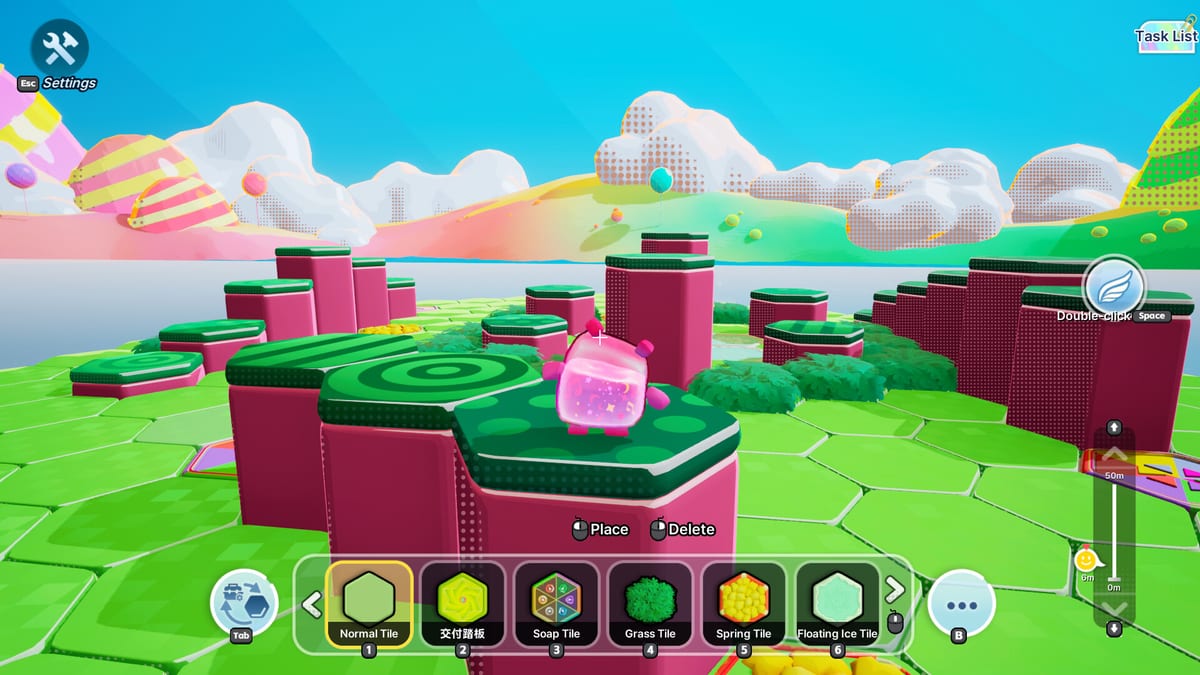
Official Jelly Bubble arenas teach the basics, but long-term replay lives in Create Mode — BINGOBELL’s built-in DIY map editor for custom party battlefields. Steam store pages highlight community favorites: trampoline-only sky arenas, full-speed boost racetracks, and layouts “even more ridiculous” than either template. This guide explains how to enter the editor, place objects like trampolines and speed boost pads, test with friends, and share maps so your group never repeats the same soap chase twice.
Why the map editor matters
Jelly Bubble’s core loop — collect soap, exploit color attract and repel, deposit at the scoring point — stays constant, but arena geometry reshapes every decision. A flat official map rewards dash chains and direct steals. A vertical trampoline map rewards double jump dash timing and mid-air color switches from the Controls guide. Boost-heavy tracks turn matches into carry races where soap type choice matters more than brawling.
Player reviews on Steam frequently cite the editor as the reason sessions stay fresh after launch week. If your group mastered built-in modes, custom maps reset the meta overnight.
Entering Create Mode
- Launch Jelly Bubble from Steam.
- Open the main menu and select Create Mode or Map Editor — label may vary slightly by patch.
- Choose New Map to start blank or Edit an existing local save.
- Pick a base template if offered (flat arena, elevated platforms, open skybox).
- Name your map for later sharing and lobby selection.
Create Mode uses partial controller support like the rest of the game. Most builders prefer mouse and keyboard for precise placement; couch players can browse finished maps with gamepads but may find fine editing awkward. See Multiplayer Setup for device recommendations.
Editor interface overview
While exact UI labels evolve with BINGOBELL patches, the workflow follows standard level-editor patterns:
| Panel / action | Purpose |
|---|---|
| Object palette | Lists placeable pieces: platforms, trampolines, speed pads, hazards, spawns |
| Place tool | Click or confirm to drop selected object into the scene |
| Move / nudge | Adjust position on X, Y, Z axes |
| Rotate | Turn ramps, pads, and walls for intended player approach angles |
| Delete | Remove misplaced objects without resetting entire map |
| Test play | Launch solo or invite friends to trial physics before publishing |
| Save / share | Write local file and export to sharing pipeline when satisfied |
Undo mistakes early — stacked trampolines with wrong rotation launch jellies into void zones unintentionally, which is funny once and frustrating forever.
Core placeable objects
Trampolines
Trampolines launch jellies vertically or diagonally depending on angle. They amplify repel collisions — bouncing a mismatched rival into a trampoline sends them skyward while you dash toward the scoring point. Trampoline-only arenas, promoted on the Steam page, remove ground safety and force aerial color mind games constantly.
Design tips:
- Space trampolines so double jump dash can chain between them without dead air.
- Place scoring points where landing momentum still allows a deposit interact.
- Avoid infinite bounce pits unless the goal is pure comedy, not competitive balance.
Speed boost pads
Speed boost pads add horizontal velocity along a facing direction. Steam marketing showcases full-speed boost racetracks where soap carriers sprint loops instead of brawling in a central pit. Boost pads interact with size scaling from soap stacks — larger jellies accelerate slower but hit repel collisions harder at boost exit.
Design tips:
- Curve pads gently; 90-degree boost corners throw jellies off track at high soap counts.
- Pair pads with rare soap spawns at loop ends to reward risky carries.
- Add repel choke points after long boost straights so defenders can counter runaway leaders.
Platforms, walls, and hazards
Beyond trampolines and pads, builders place standard platforms, walls, void zones, and soap spawn points. Elevated platforms create vertical scoring routes; narrow bridges force steal attempts on thin geometry where repel knocks rivals off instantly.
Scoring point placement
Every competitive custom map needs at least one scoring point. Position it where approach paths differ — not always at map center. Hidden ramps, boost entries, and trampoline drops into the pad keep deposit phases unpredictable.
Building for game modes
Jelly Bubble includes multiple competitive and cooperative modes. When publishing:
- Free-for-all maps need symmetric spawn and soap access so no jelly starts trapped.
- Team modes benefit from parallel lanes so escort strategies using same-color attract make sense.
- Race-leaning layouts minimize dead-end corners where carriers get pinned without repel escape options.
Test each mode your group actually plays — a map perfect for four-player couch may clog with six online players.
Testing and iteration loop
- Place a minimal playable layout: floor, spawns, one scoring point, a few soap spawns.
- Test play solo to verify collision and boost speeds.
- Invite one friend for steal and deposit timing under real color switching.
- Expand with trampolines and pads incrementally — one gimmick per revision.
- Run a full 2–4 local or six-player online session from Multiplayer Setup before calling the map done.
Watch for unintended shortcuts. Boost pad chains that skip half the map feel clever in testing but ruin score balance in repeated sessions.
Sharing custom maps with friends
BINGOBELL supports sharing created arenas through the game’s community pipeline — select your saved map in the lobby host menu so friends download or reference the same file. Steam community threads also showcase creator challenges and featured chaos maps after launch events.
Sharing checklist:
- Unique name so lobbies identify your map instantly.
- Version note in description when you rebalance soap spawns after feedback.
- Player count recommendation — trampoline mazes may suit four players better than six.
When hosting, pick the custom map before inviting Remote Play Together guests so they load the correct geometry on join.
Popular map archetypes
| Archetype | Key objects | Skill emphasized |
|---|---|---|
| Trampoline skybox | Trampolines, thin platforms | Aerial dash, color repel |
| Boost racetrack | Speed pads, curved walls | Soap carry speed, deposit timing |
| Soap gauntlet | Dense spawns, narrow bridges | Steals, dive interrupts |
| Scoring point siege | Central pad, radial ramps | Team escort, blast soap |
| Chaos pit | Everything mixed | Adaptability, humor |
Rotate archetypes weekly so skills from Getting Started stay sharp instead of overfitting one layout.
Editor limitations and workarounds
Partial controller support means fine placement may require a mouse. Large object counts can affect performance on minimum-spec PCs — trim decorative pieces if framerate drops during six-player physics. Some official soap types may be restricted in certain templates; verify spawn tables in test play rather than assuming parity with dev maps.
Creator challenge and community
BINGOBELL ran launch-window Creator Challenge events encouraging players to share bubble chaos clips and custom arenas. Participating exposes your map to wider audiences and surfaces design ideas — study trending layouts for boost pacing and scoring point placement even if you never publish publicly.
Related guides
The editor connects to every gameplay system. After building, ensure your group understands Controls for movement tech on custom geometry, Steal, Soap & Score for spawn density tuning, and Color Mechanics for repel-trap bridge designs. Custom maps are Jelly Bubble’s force multiplier — official content teaches rules; your trampolines and speed pads teach memories.
Frequently Asked Questions
Quick answers to the most common questions.
Does Jelly Bubble have a map editor?
Yes. Create Mode is a DIY map editor for building custom arenas with platforms, trampolines, speed boost pads, soap spawns, and scoring points.
Can I share custom maps with friends?
Yes. Save your map and select it when hosting a lobby so friends load the same custom arena in local or online multiplayer.
What objects can I place in the editor?
Common objects include trampolines, speed boost pads, platforms, walls, soap spawn points, hazards, and scoring point locations.